
Agentic Development

Agentic development is creating software with AI agents that plan and do the work. You set a goal, and the agent edits files, runs commands, and checks results until it completes the task.
If the tests and reviews performed by your team are weak, agents can scale that weakness. The DORA 2025 report states that AI is an amplifier, “magnifying an organization’s existing strengths and weaknesses.” This page defines the term, discusses the tools, and describes the impact this has on teams.
What Agentic Development Means
Agentic development means working with AI coding agents that pick their own steps and tools to reach a goal, instead of suggesting one completion at a time. Anthropic separates workflows, which run a model and tools through predefined code paths, from agents, which direct their own process and tool use.
The agent works in a loop. It plans, acts through tools, and reads the result, and Anthropic’s guide to building agents calls that “ground truth” from the environment crucial at each step. You set the goal, answer at checkpoints or blockers, and review the result, while stopping conditions such as an iteration limit keep the agent bounded.
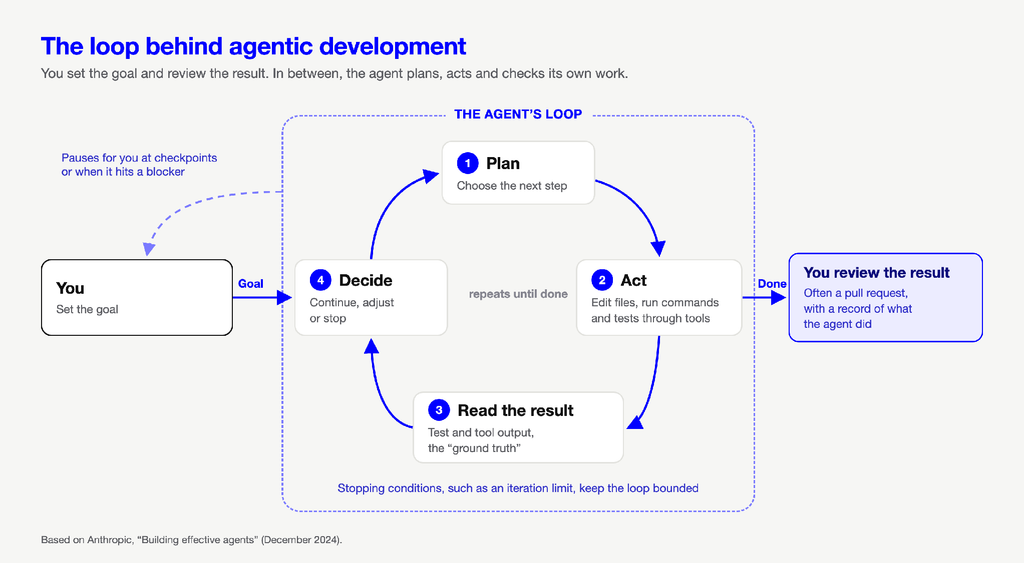
Vendors use “agentic” loosely, for anything from an agent you steer step by step to agentic workflows that run whole tasks. How agents fit across the lifecycle is the agentic SDLC.
Agentic IDEs vs. Agentic Development Environments
Neither term has a standard definition, and vendor pages that use both draw the line in different places, so treat this as one common way to see it.
An agentic IDE is an editor with agents built in, where you stay in the editor and direct each step. An agentic development environment is built around agents as participants in their own right, where you delegate a goal and review the outcome.
The lines are blurring as each kind of tool picks up features from the other. The more useful question is how much your team delegates, and how it checks what comes back.
The Core Capabilities That Define True Agentic Tools
A tool earns the label “agentic” when it does most of the following:
- Plans over several steps: It directs its own process and tool use instead of following a fixed path.
- Acts through tools: It edits files, runs commands and tests, and reaches other systems through MCP, which Anthropic calls an open standard for connecting AI-powered tools to data sources.
- Checks against ground truth: It runs tests or code and reads the results to determine its next course of action.
- Works within limits: What it can do is limited by stopping conditions, human checkpoints, and sandboxed testing.
- Manages its context: It treats context as what Anthropic calls a finite resource and loads data just in time through tools.
Autocomplete with a chat box isn’t agentic by this test. It suggests code for one step, but it doesn’t run that code or check what happens. You run it, read the output in your debugging tools, and pick the next step, so the loop stays with you.
What Changes for Engineering Teams and Workflows
DORA’s 2025 report found that AI’s relationship with software delivery throughput has turned from negative to positive, while AI adoption is still associated with rising instability. DORA’s AI Capabilities Model names seven capabilities that help, including working in small batches.
Perceived speed can also differ from measured speed. In METR’s July 2025 trial, 16 experienced open-source developers using tools from early 2025, with AI allowed, took 19% longer but believed it sped them up by 20%. METR has since considered those results out of date.
Agents open more PRs, faster, so the bottleneck moves from writing code to trusting it. Building that trust is where Hud works, bringing runtime context to every change, along with your coding agents, CI, and CD. Our runtime code sensor counts every call to every function and learns its baseline, to allow us to rate every PR before it is merged, and to compare every function with its baseline, as the new code takes traffic. When a function regresses, Hud finds and names it, along with the deploy that caused it, and gives your coding agent the evidence to fix it.
Delegate the Code, Keep the Checks
Trusting agents to solve problems shifts focus from writing code to articulating objectives, supplying context, and verifying what the agents return. See also AI SDLC and production monitoring. To find your gaps, trace one recent PR written by agents and specify every check it passed.
See how Hud brings runtime context to every change your agents write, from PR to fully deployed.
FAQ
Can agentic tools operate across multiple repos and services simultaneously?
It depends on the tool. The agent needs access to each repository and a way to reach the other services, for example through the Model Context Protocol, an open standard for connecting AI-powered tools to data sources. Because its context is finite, it should load what it needs just in time rather than read every repo at once.
What guardrails prevent agentic tools from making unsafe code changes?
No guardrail does it all, so teams layer them. Control what the agent can access and where it runs. Set stopping conditions and human checkpoints. Test in a sandbox before an ordinary review and CI. DORA’s AI Capabilities Model encourages small batches and strong version control with frequent rollback. Platform teams also need scoped identities and approval gates for agents.
What context do AI coding agents need to work accurately?
They need instructions, conventions, code and tests, means to act and check their work, retrievable data, and the task’s history. Anthropic considers context a finite resource, so the goal is the right information and not the most. At Hud, we’d add runtime context, what each function does in production. Neither the code nor the diff shows it.
How do agentic development tools handle conflicting instructions from engineers?
Tools usually layer instruction files and let the more specific one win. In one tool’s AGENTS.md documentation, files closer to the working directory override earlier guidance, and an override file replaces the regular one in its directory. The page doesn’t say how a prompt typed in the session ranks against those files, and behavior differs between tools.