You’ve probably seen it, or done it yourself. Someone shuffles to a meeting holding a half-open MacBook carefully like a full cup of coffee, because Claude Code or Cursor is still in the middle of a task and the laptop can’t go to sleep.
Dana, a backend engineer at a payments processing platform company, works similarly. She asked her AI agent to add unit tests to the payment refund endpoint and resolve a timeout issue. The agent, independently, found a slow query, edited the code to resolve the timeout, and initiated the test suit. Dana had to leave for a meeting, while the tests were running in the background.
This illustrates the trade-off that developers have with agents. Developers are offloading work to agents, but they’re still bound by the laptop’s resources: its files, CPU, credentials, and battery. It is like we have handed off the coding but haven’t given it dedicated resources to run the code.
These challenges affect developer productivity, turning agentic AI software development into a platform engineering concern.
Key Takeaways
- Once a coding agent escapes from a developer’s laptop, it is a new player in the engineering ecosystem.
- Thus, there are platform questions: Where does it run? Who is it? What can it do alone? What does it know? What did it do? When does it stop?
- One developer can set up one agent really well. Only the platform can give the same answers across hundreds of repositories.
- Human review is most critical at real risk areas, such as merges and production changes. It isn’t important at every single small step.
What Changes When the Agent Leaves the Laptop
The first kind of AI coding help was a conversation. You would type a prompt, get a suggestion, and decide what to do next. It’s more like an evolution from searching in google.
The real benefit of AI coding agents is the potential for handing off an entire task and moving on to the next. That kind of agent needs its own environment to work in, like a cloud VM or remote workspace that stays on after the laptop closes. Cursor Cloud Agents run tasks in isolated cloud VMs. Claude Code on the web runs tasks in Anthropic-managed sandboxes and opens a pull request when it’s done. Coder Tasks allows companies to run agents like Claude Code in their own self-hosted environments.
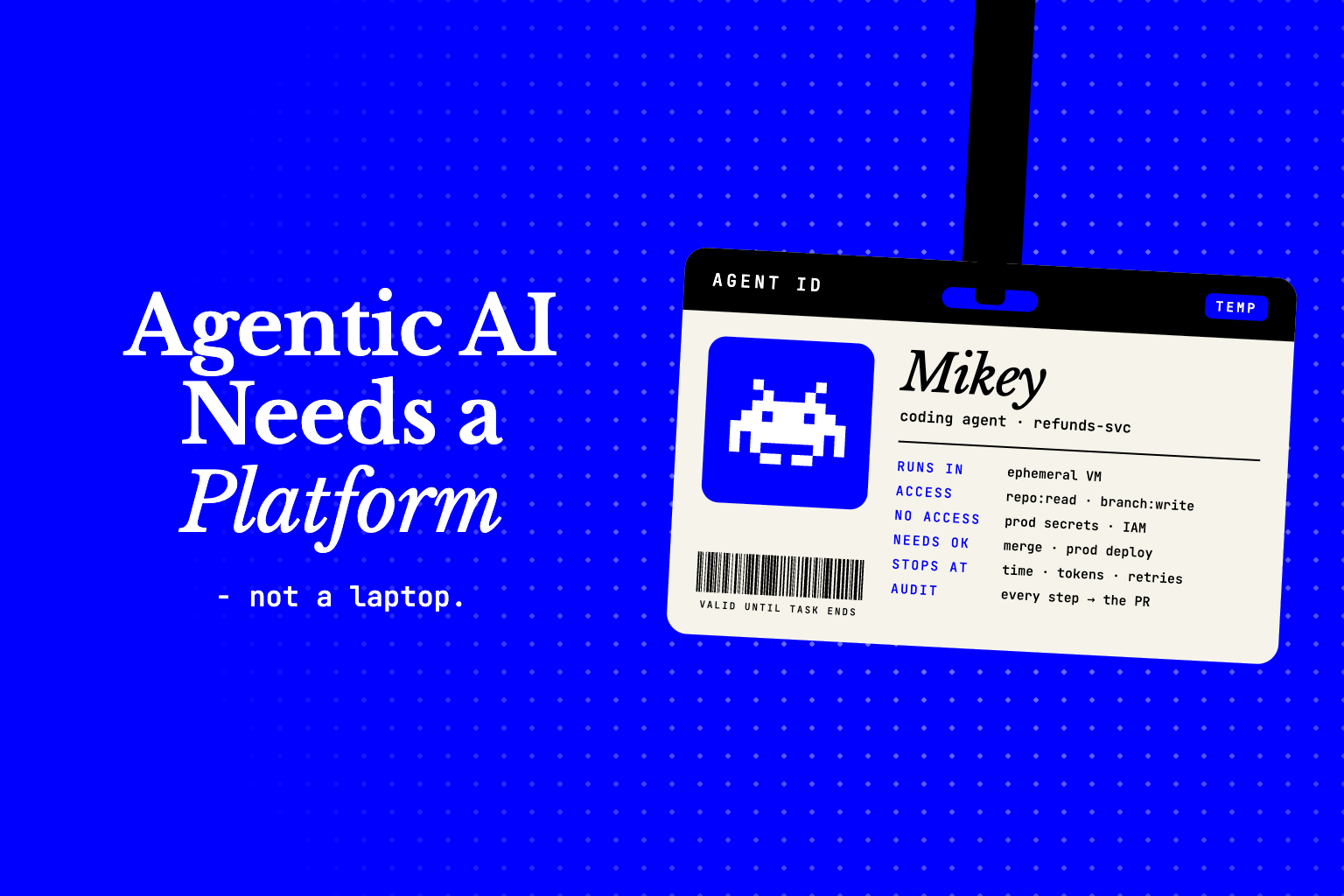
The following week, Dana tries using a cloud agent. Let’s call it Mikey. Dana gives Mikey the refunds ticket and closes her laptop. Mikey reads the issue, finds the query, edits the service code, adds tests, runs the test suite, and fixes a lint error. It then creates a pull request. Dana reviews it in the morning.
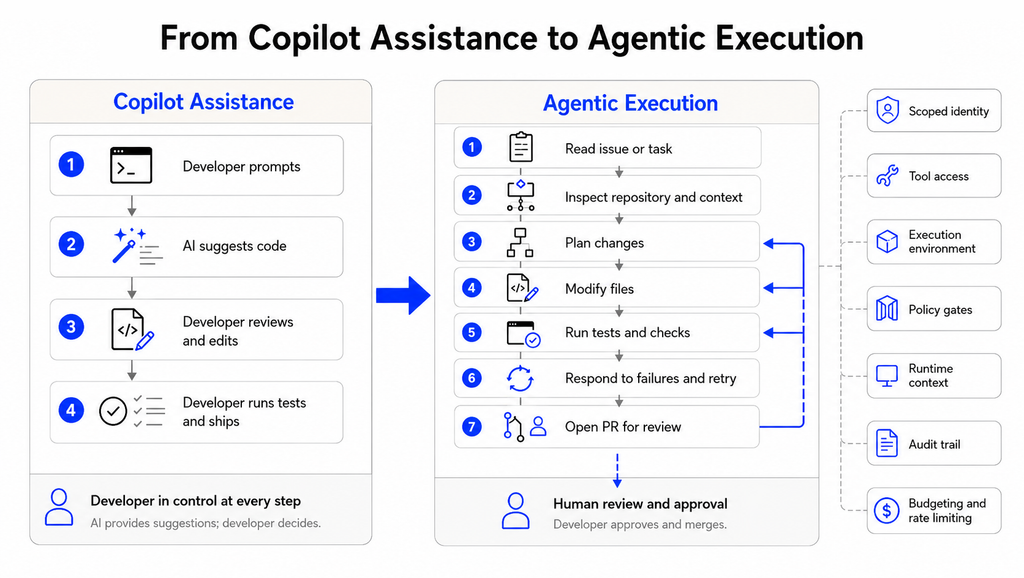
The novel change isn’t that AI can do more steps. It is that the work occurs independently of the developer who started it. A process based on agentic workflows can ultimately achieve the goal. If we build an additional agent to review Mikey’s work, then agentic AI development begins to look like a team process across the agentic SDLC, rather than a feature in a code editor.
A New Machine Actor in the Engineering System
On Dana’s laptop, Mikey took everything: her Git login, cloud keys, and network. In the cloud, nothing is free. Before Mikey gets access, someone has to fill in the following blanks:
- Where does it run?
- What identity does it use?
- Which systems and credentials can it reach?
- Which actions can it take without asking?
- What information can it use to make decisions?
- How do we know what it did?
- What stops it when it loops or fails?
These are not IDE questions. These are questions regarding compute, identity, policy, and records. Already, CI/CD and service accounts require platform teams to answer these questions.
| Risk | Platform control |
| Excessive access | Scoped identities and least-privilege permissions |
| Unsafe execution | Isolated environments and restricted tools |
| Unreviewed changes | Risk-based approval gates |
| Missing context | Controlled access to engineering and runtime signals |
| Unclear agent behavior | Execution traces and audit records |
| Runaway workflows | Time, retry, compute, and token limits |
The platform team plays IT and HR. It issues your badge (identity), gives you a desk (environment), provides the company’s rules (policy), and conducts your performance evaluation (audit). Without that shared layer, every team makes its own rules, and enterprise AI SDLC agents end up governed in many different ways.
Following Mikey Through One Task
We break down each question below and show how it plays out while Mikey works on the refunds ticket.
Where Does It Run?
Mikey runs code it writes and code it finds. It can build the project from source and do all the administration required to create and package software. Hence, it needs constraints on files, network, credentials, and other computing resources.
An ephemeral environment is the safest default and works well. This means Mikey gets a clean copy of the source code, works on it, and gives it back via a pull request. The environment is then destroyed. Compared to a work laptop, which has lots of cached packages and tokens, the ephemeral environment makes it easier to reproduce failures.
Who Is It?
On the laptop, Mikey was Dana. Mikey could see everything with her full credentials. With the logs showing Mikey’s and Dana’s actions together, nobody could separate the two. With Mikey having access to everything, it could access systems unrelated to refunds.
In the cloud, Mikey needs to have its own identity for the task: read access to the repo and write access to a working branch. Production secrets, IAM settings, and deploy controls have to remain inaccessible. The platform has to have a single standard method to control the credentials’ lifecycle (issue, rotate, and revoke).
What Can It Do on Its Own?
Reading source files and merging pull requests are not the same. The same goes for writing a deployment plan and running it against production.
A reliable agentic AI development framework puts policy in each of these actions (not just at the end). Policy would allow low-risk changes to occur automatically, and hold higher-risk changes for review based on the repo, the files changed, and the infrastructure and environment to which the change is being deployed.
There also needs to be consistency. A change that requires approval in one team should not be allowed to occur automatically in another team just because a different agent was plugged in.
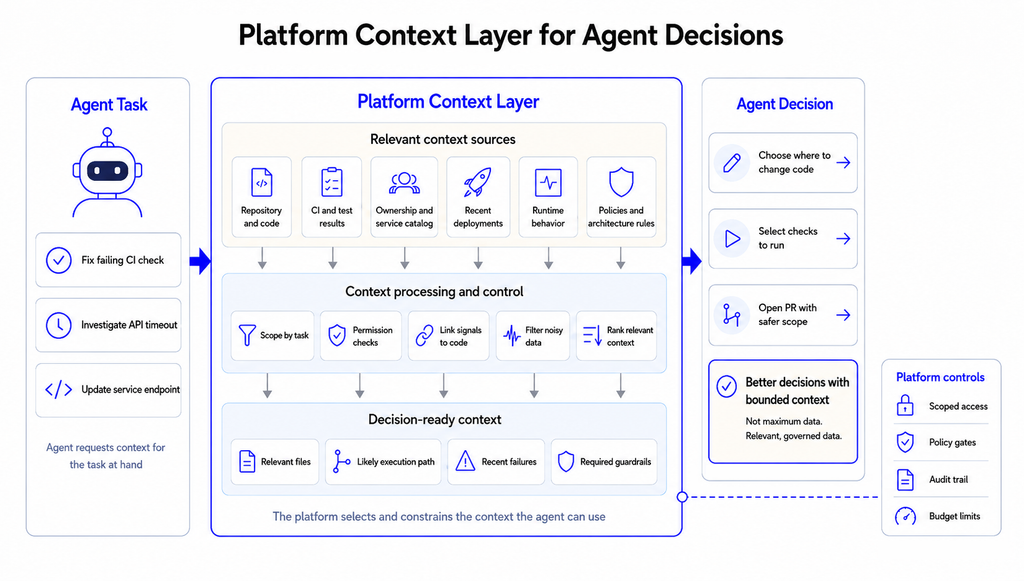
What Does It Know Before It Acts?
The repo gives Mikey the structure of the code, not the behavior. Three code paths in the refunds endpoint could cause a timeout, and from the code alone, Mikey has to guess.
Engineers rely on CI results, ownership rules, recent deploys, and production behavior to assess changes. Agents need the same evidence. Hud provides coverage for behavior in production. Its Runtime Code Sensor captures function-level behavior in production, and its MCP server passes that data to coding agents. Now, Mikey is able to assess which path real refund traffic takes and which function got slower after Tuesday’s deploy.
Can We Reconstruct What Happened?
Mikey failed two tests and changed approach twice before the final version. The diff doesn’t show any of that.
The platform must keep a log of each step of the process. This includes the name of the task, the files and tools used, the commands entered, outputs and errors produced, the checks that were made, and where a person approved or stopped the run. The agent must be configured to log a trace for each task, associate it with the pull request, and store it for later analysis. Traces allow the platform to detect where agents are failing.
What Happens When It Gets Stuck?
Mikey can loop. It repeats the process of modifying the code to fix a test but breaks another in the process.
The platform should have a limit on how many agents can run at the same time, and each workflow should have a maximum run time, a token budget, and a limit on how many times a task can fail. Each workflow should have a stop rule. The best result may be a brief failure report explaining why the process was stopped and what was broken.
Why This Cannot Be Solved at the Developer Level
Dana can control Mikey pretty well. She can limit its tools and keep secrets away from it. What she can’t control from a config file is whether the 40 other teams do the same.
One person can’t ensure identity management across hundreds of repositories and the same approval rules across all teams, or build audit records across source control, CI, and cloud services.
Practices and process controls also differ across teams. One team allows agents to merge small, low-risk, dependency updates. A second team reviews all changes, and a third has no defined process at all. Teams should choose these differences intentionally.
As agentic development continues to expand, these rules will need to be managed by the platform, not by every developer individually. Approved environments can control appropriate defaults. Developers can still have the final call.
Final Thoughts
The first phase of AI-assisted development put more powerful algorithms in developers’ tools. The next phase will put agents in the engineering team, which will allow developers to work while agents handle other tasks, such as coding while developers attend meetings.
Therefore, agentic development becomes a part of platform engineering. Agents will only be effective in helping developers if the platform decides for them where to run, what to touch, what to know, and when to stop. Only then will developers like Dana be able to close their laptops and not have to worry about coding.
If production context is the missing piece in your agent setup, try Hud and show your coding agents how your code actually runs.
FAQ
How is agentic AI software development different from using an AI coding assistant?
An AI coding assistant writes code for the developer and lets them take charge of the next steps. Agents can do multiple things on their own, like edit code files, run tests, and even open pull requests. Once it completes a task, it transfers control to the developer.
What do platform engineering teams need to support coding agents at scale?
Agents have scoped identities, giving them limited control, and isolated environments prevent control and data leakage. Policy-based approval gates govern risky actions. Agents can use engineering and runtime contexts to learn more about their environment. The operating model is defined with execution traces and limits on retries and resources.
How do you govern AI agents across the software development lifecycle?
You can control what tools an agent can use, what actions it can take, and when it needs approval. You can even control what an agent can do, isolate it, and record what it does. Workflows have a defined failure path. Maintain human control over high-risk production changes.
About authors