
AI SDLC

Over the last few years Software Development Lifecycle (SDLC) is undergoing a rapid change with the use of AI. And, AI is being used to plan tasks, write code, generate tests, review changes, and investigate production issues faster. But it also creates a new responsibility where most of the AI-assisted output needs engineering judgment before it reaches production.
What Is the AI SDLC?
The AI SDLC is the software development lifecycle adapted for teams using AI across various stages of the workflow. It describes how AI tools support the way software moves from an idea to production.
In a traditional software development process, the majority of the work depends on human execution. Developers read requirements, write code, create tests, review changes, and respond to production issues. AI changes that rhythm where it can summarize requirements, generate code, explain failures, suggest tests, review pull requests, and help teams understand production behavior faster.
The AI SDLC is not about removing developers from the process. It is about changing where developers spend their time. Less time goes into repetitive work while more time goes into strategy, planning, judgment, architecture, security, and release confidence.
How the AI SDLC differs from the traditional SDLC
A traditional SDLC moves in clear stages. You gather requirements, design, code, test, deploy, then maintain. In a traditional linear model, each stage usually waits on the one before it, and each has an owner.
The AI development lifecycle changes two things:
- First, its the pace of doing things. Tasks that used to take hours (writing boilerplate, generating test cases, summarizing a stack trace) now take minutes.
- Second, is the attention. Less focus goes to writing code while more goes to reviewing, prompting, and deciding whether the AI got it right. The bottleneck moves from “how fast can I code this?” to “how fast can I review generated code?”
That second shift is bigger than it looks. Reviewing AI output is a real skill, and it isn’t the same as writing code from scratch.
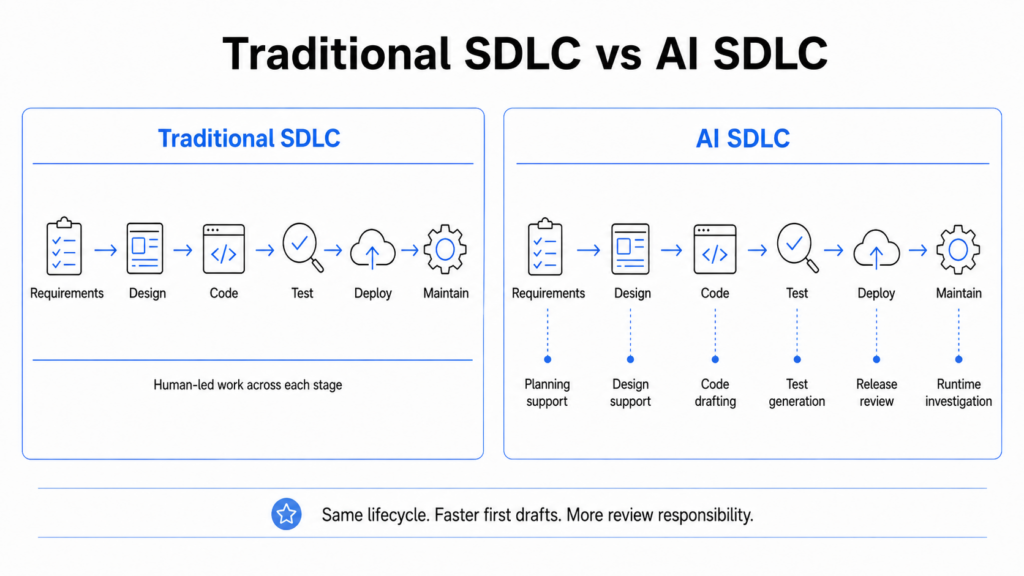
How AI fits into each phase of the SDLC
AI does not replace a phase. It sits inside each one and does part of the work.
- Planning: turn a rough feature request into user stories, and flag requirements that contradict each other.
- Design: sketch API contracts, suggest a schema, or compare a couple of architecture options.
- Coding: autocomplete, generate boilerplate, explain inherited code you don’t understand.
- Testing: test data generation, unit test writing, edge cases missed by humans.
- Deployment: draft CI/CD config and help flag risky changes before they merge.
- Maintenance: summarize errors, spot patterns in logs, and suggest a fix for a bug already in production.
In agentic SDLC, when AI agents gets a complete context of both runtime and static code, the accuracy increases and agent suggestions becomes more useful.
Benefits of the AI SDLC
- Faster delivery: Routine tasks get done in a fraction of the time, so features ship sooner.
- Less busywork: Developers offload boilerplate and repetitive edits and spend more time on hard problems.
- Fewer obvious bugs: AI catches typos, missing null checks, and forgotten edge cases early.
- Easier onboarding: New engineers can ask an AI to explain a codebase instead of waiting on a teammate.
None of these are fully automatic. You get these advantages when the tools are set up well and the team actually reviews the output.
Risks and Challenges of the AI SDLC
AI generated code can look clean while still being wrong. It may pass local tests but fail in production because it missed a data condition, service dependency, security rule, or legacy behavior.
Context is one of the biggest weaknesses. AI tools may understand the files they are given, but they may not know how the code behaves in the real system. They can miss:
- Styles and team conventions
- Hidden dependencies
- Production traffic patterns
- Frequently used code paths
- Functions that fail only under real runtime conditions
This is where runtime context becomes important. An AI agent may understand the code it can see, but still be unfamiliar with how that code behaves in production. It may not know which function is frequently executed, which endpoint depends on it, or whether the failure only appears under real traffic. Runtime context closes that gap by showing what the code actually does, which functions are affected, and where the real failure is happening.
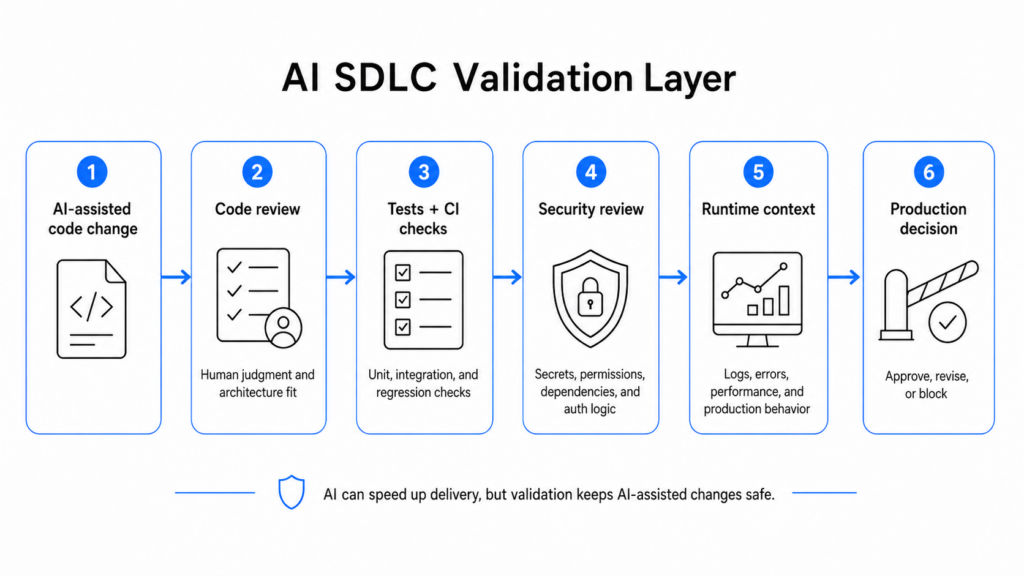
Security also needs careful review. AI can introduce weak patterns, mishandle secrets, weaken authorization logic, or suggest unsafe dependency changes. Teams should treat AI output as unverified until it passes review, testing, and security checks.
Licensing is another concern. Generated code may pull in dependencies nobody vetted or reproduce patterns from sources with unclear terms. Snyk has written about the security side of this in detail.
There is also skill drift. Junior developers who lean on AI for every step may miss the deeper learning that comes from reading code, debugging failures, and understanding why a fix works.
FAQ
Is the AI SDLC only relevant for large engineering teams?
No. Small teams often gain more, proportionally. A three-person startup can use AI to cover work it can’t afford to hire for, like writing tests or drafting docs. Large teams get scale benefits, and the tools help individual developers just as much, sometimes more.
Does adopting an AI SDLC require replacing existing tools?
Usually not. Most AI features plug into what you already use, such as your IDE, your CI pipeline, your issue tracker. You add a layer rather than rip anything out. Start by turning on AI inside one tool your team already trusts, then expand once people see it working.
How does the AI SDLC affect the role of QA teams?
QA goes from writing every test to designing test strategy and reviewing the output of AI. Machines are good for repetitive cases. Machines handle repetitive cases well. Humans focus on tricky edge cases, exploratory testing, and deciding what good enough actually means. The role gets more strategic, not smaller.
How long does it take to see results after adopting an AI SDLC?
Some gains show up in days. You will immediately get benefits from faster autocomplete, quicker boilerplate. Overall results, like better test coverage and fewer production bugs, take a few months, because they depend on new habit formations. It’s important to expect a small dip first while people learn to prompt and review well, helping them to learn and adopt. Then you can see a steady climb that surpasses the speed and accuracy than ever before.