Today AI coding assistants are widely used on a daily basis for software development. They help developers write code and understand it, generate tests, and review changes with greater speed. But shipping software isn’t just about writing more code. Teams still need to understand requirements, take architecture decisions, check security risks and meet compliance needs.
Agentic workflows are AI-assisted workflows where one or more agents help plan, execute, check, and complete specific SDLC tasks. Instead of only generating an answer, the workflow can move across steps such as reviewing code, running tests, checking context, suggesting fixes, and routing work back to a developer when needed.
This is where agentic workflows come in. Agentic workflows are automated, AI-assisted workflows where one or more agents help streamline specific tasks across the SDLC. Instead of only generating an answer, the workflow can move through steps such as reviewing code, running tests, checking context, suggesting fixes, and routing work back to a developer when human judgment is needed.
The adoption is moving quickly. Around 79% of enterprises have already adopted AI agents, but only 11% run them in production. This gap exists because agents need visibility into how software behaves in real environments.
Why Agentic Workflows Matter
Agentic workflows matter because software development rarely happens in one step. Even a small code change requires finding the right files, following existing patterns, running tests, fixing failures, updating documentation, and finally preparing the Pull Request.
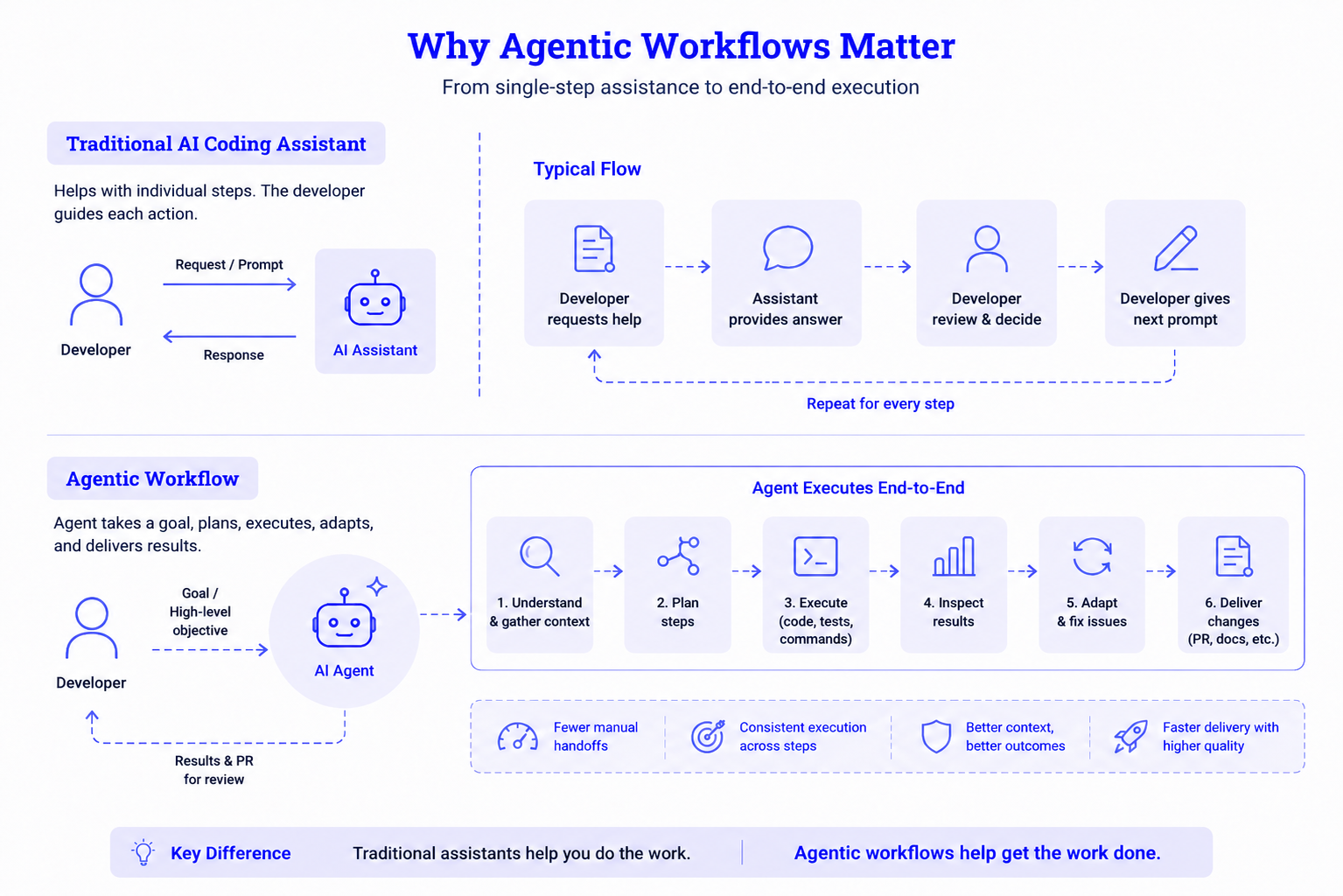
For example, instead of only generating a test file, an agent can inspect the repository, understand the test structure, write tests, run them, fix failures, and prepare the work for review. That is the value of autonomous AI workflows. They reduce manual movement between tools. To use agents in production, access to code alone is not enough. Agents also need to understand how the code behaves in real environments.
Key Capabilities of Agentic Workflows
A strong agentic workflow is not just an AI assistant connected to your code. It needs more capabilities that make it useful in real software delivery.
- Task planning: Agents can break unclear goals into smaller steps, such as reading a ticket, finding related files, checking existing patterns, and deciding what to do next.
- Tool execution: Agents can call APIs, run commands, write code, generate tests, edit documentation, and create pull requests across the SDLC.
- Adaptive execution: When an agent’s step is blocked by a failed test, build error, or production signal, it can analyze the output, adjust its approach, and either notify the developer with context or attempt a safe fix before rerunning the tests.
- Multi-agent collaboration: When sufficiently coordinated, various agents are capable of executing the steps of planning, coding, testing, and reviewing in parallel.
- Built-in observability: Through execution traces, token budgets, hard limits, and runtime context, teams can understand what agents did and what production behavior influenced their decisions.
Practical Use Cases Across the SDLC
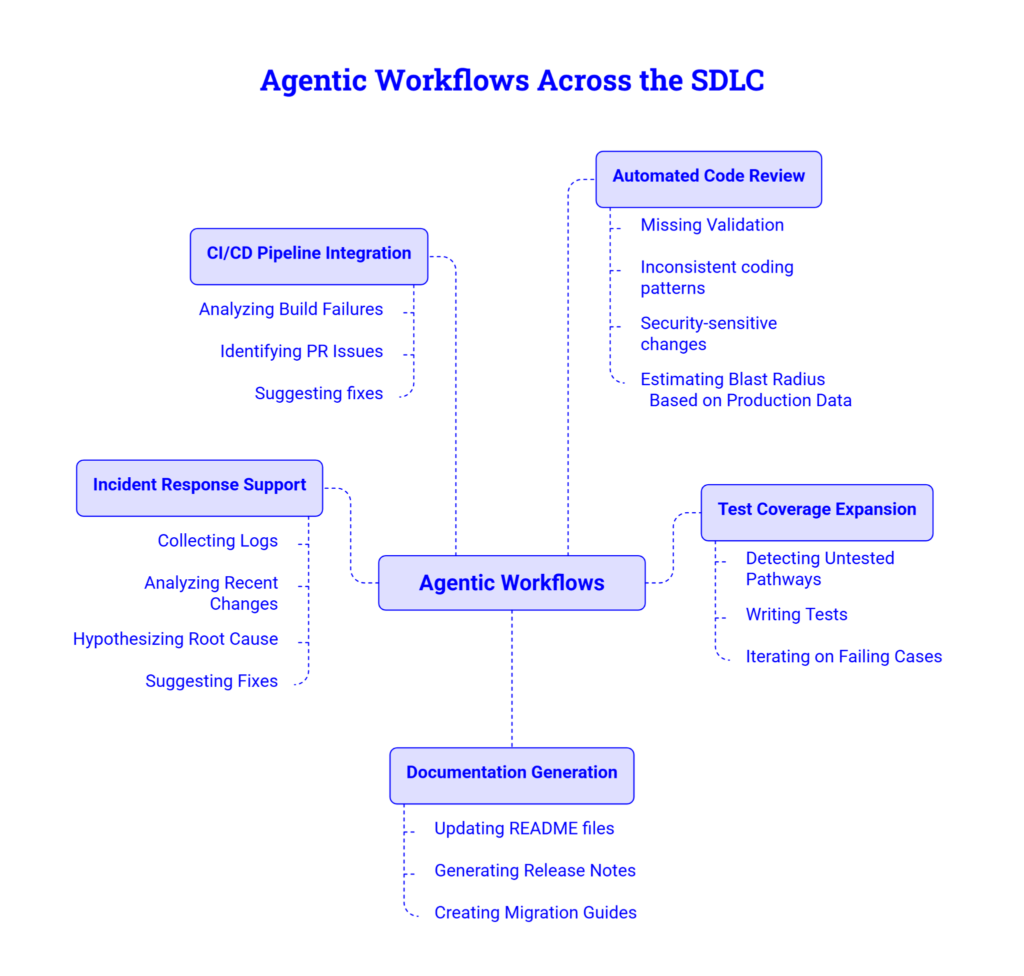
Agentic workflows can support several stages of the software development lifecycle, particularly tasks that involve multiple steps and provide clear feedback. They work best when an agent can analyze context, take action, verify results, and refine its output.
Automated Code Review
AI-assisted code reviews still require human input. AI is useful for identifying edge cases, risks in production, issues that manifest in repeated incidents, and cases where the assumptions lie in tacit knowledge. Agents can review Pull Requests for issues such as missing validations, inconsistent coding patterns, weak test coverage, and changes involving security risks and high-impact, untested dependencies. Agents can use context from the production environment provided by Hud, to assess potential blast radius when changes are made, and identify what users, services, and runtime paths will be impacted. While the agent provides additional context for the engineer, it does not eliminate the need for the engineer to conduct a complete code review.
Test Coverage Expansion
Agents can also be used to facilitate the coverage of automated tests. These agents can detect code paths in code that are not being tested, write tests, execute these tests, and iterate on the failing cases. The goal of the task automation framework is to generate measurable results, and the coverage of automated tests is one area that lends itself to this framework.
Documentation Generation
Documentation becomes harder to maintain as engineering throughput increases. More features, fixes, design decisions, and operational changes move through the SDLC, which means teams need a faster way to capture context before it disappears. Agents can update README files, generate release notes, create examples, and draft migration guides directly from code changes, helping teams keep documentation closer to the actual state of the code.
Incident Response Support
In incident response, an agent can do more than collect logs or summarize errors. It can form possible root-cause hypotheses, check them against logs, recent deployments, metrics, and related code changes, then narrow the investigation before an engineer takes over. The agent should not make time-critical production decisions on its own, but it can reduce the manual effort needed to gather context and prepare a clearer starting point for debugging.
CI/CD Pipeline Integration
A natural environment to implement task automation is the CI/CD pipelines. Agents can analyze why a build has failed, a PR has been opened, or why a security scan has raised an issue and provide a potential solution, complete with a pull request ready for review.
This allows teams to integrate agentic capabilities into existing development processes with least friction.
The Main Challenges With Autonomous AI Workflows
One of the biggest challenges with autonomous AI workflows is the risk involved when AI agents are given access to live production environments. Production environments often contain sensitive information, system configurations, deployment pipelines, credentials, and other critical resources.
When human engineers make changes in these environments, they rely on experience, domain knowledge, and observability tools to understand potential risks and avoid costly mistakes.
AI agents require a similar level of oversight. However, traditional observability tools were designed for human operators rather than autonomous systems. While logs, traces, and dashboards are useful for monitoring and troubleshooting, they do not always provide the detailed environment context that AI agents need. When making decisions, agents must understand how applications behave in production and the details on how different components interact.
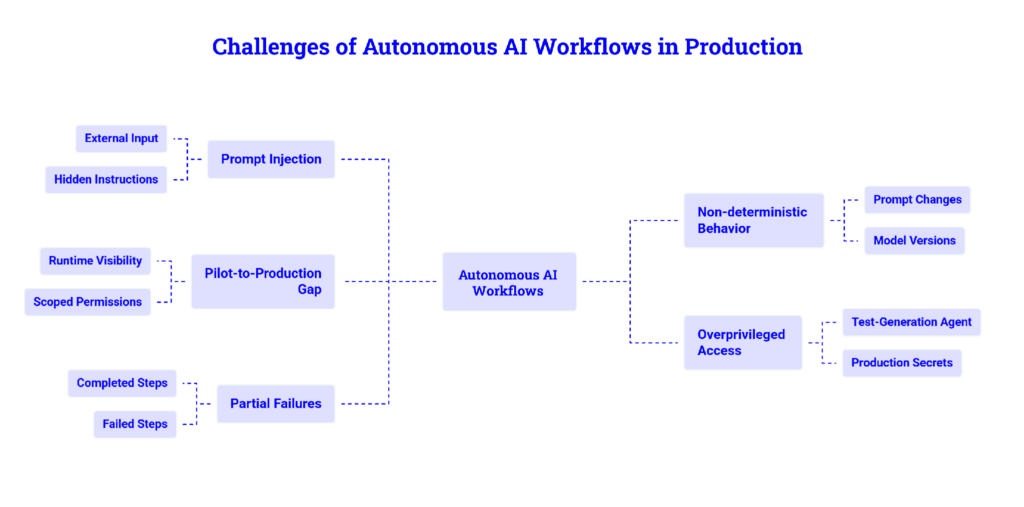
When agents are allowed to perform actions in the production, the core challenges comes from mainly five areas:
- Prompt injection: Agents read content from repositories, issues, logs, APIs, documentation, and web pages. A hidden instruction inside these sources can try to redirect the agent, bypass rules, or expose sensitive data. Teams should treat external input as data, not authority.
- Non deterministic behavior: AI agents may not behave the same way every time. Small changes in prompts, model versions, context, or tool outputs can lead to different results. This makes debugging harder unless teams can see the full execution path.
- Pilot to production gap: Agent demos often work well in controlled environments, but production requires runtime visibility, scoped permissions, audit trails, rollback paths, cost controls, and human approval gates. Without these, agents may work in a pilot but become risky in real systems.
- Overprivileged access: Early prototypes often give agents broad permissions because it is easier. In production, this is dangerous. A test generation agent should not have access to production secrets or deployment systems.
- Partial failures: Agents may complete one step but miss another. A production workflow must clearly show what was completed, what failed, and what still needs human review.
Best Practices for Shipping Agentic Workflows in SDLC
Using agentic workflows in the SDLC requires more than a good prompt. Teams need infrastructure that controls how agents operate, what tools they can access, how they use runtime context, and when human approval is required.
The first step is setting up a strong AI workflow orchestration layer. This layer should define the workflow path, permissions, tool access, retry rules, token budgets, runtime context, and approval gates. Without this layer, agents operate with unclear boundaries. With it, they become controlled participants in the software delivery process.
A production ready orchestration layer should manage:
- Which tools and repositories can the agent access
- A broader context on observability for agents
- Token limits, execution time, and retry counts
- Approval rules for risky actions
- Logging, tracing, and audit records
- Failure handling when the agent cannot complete the task
Tracking Agent Actions
Agent execution traces should be treated like distributed system traces. Teams need to know what the agent read, which tools it called, what commands it ran, how many tokens it used, where it failed, and whether a human approved the result. OpenTelemetry style tracing can help teams model agent workflows as a sequence of observable steps instead of a black box.
Having security controls in place is extremely important. When running code and interacting with external systems, agents should work in isolated or sandboxed environments. External inputs from repositories, APIs, logs, and web pages should be sanitized since they can be potential injection vectors which could potentially detour agent action.
Human-in-the-loop checkpoints should also be placed at the orchestration layer, at gates. Low risk actions such as reading files, generating test drafts, or summarizing failures can be automated since they have less risks of impact. High stakes actions such as merging Pull Requests, changing permissions, modifying infrastructure, or deploying to production should require human approval.
For agentic coding, the most important context is not only what the agent did, but what the code is doing in production at the function level.
Start Simple Before Moving to Multi-Agent Workflows
Multi-agent systems can be useful when different agents handle planning, coding, testing, and review. This can improve focus because each agent has a clear role. However, more agents also mean more coordination, permissions, communication paths, and failure points. Without clear boundaries, the workflow becomes harder to understand and harder to trust.
A practical approach is to start with one well-defined workflow, make it observable, and expand gradually. A simple workflow that safely handles test generation or code review is more valuable than a complex multi-agent setup that has not been tested well.
Where Hud Fits
Hud helps close the gap between code context and production behavior. It runs with the code and gives agents function-level runtime context from production, so they can understand how the application behaves while it is serving real users.
This matters when something breaks or slows down after deployment. Instead of only seeing that an endpoint is failing, an agent can identify the functions involved, where they are called from, what downstream dependencies are affected, and which part of the workflow changed.
For agentic coding, that context makes fixes more useful. Agents can use production insights to generate smaller patches, add more relevant tests, and prepare Pull Requests that engineers can review with more confidence.
Final Thoughts
Agentic workflows change how software teams interact with AI. Teams include AI in almost all aspects of a project, from planning to documentation to final review. However, just having intelligent models doesn’t guarantee successful production. Teams need orchestration, observability, governance, and security. They also need control of the AI at runtime.
Therefore, the goal is not to move engineers out of the picture. Rather it gives agents enough context and boundaries to prepare better fixes, while engineers keep control over review and production decisions. The bottleneck is not agent capability alone. It is the production infrastructure around the agent: runtime visibility, scoped permissions, orchestration, and human review.
See how Hud’s Runtime Code Sensor gives AI coding agents visibility into what your code is actually doing in production, so they can debug issues, generate fixes, and open Pull Requests with real runtime context behind them.
About authors