Today, AI coding agents can inspect code, edit files, generate tests, and open pull requests. This speeds up software development but still requires humans at key checkpoints to verify changes and reduce risk. And there are several factors that affect the accuracy of these coding agents.
The major gap is often the information we provide to the agent context. When that information is limited, it increases hallucinations, increasing the risk. One common form of hallucination is making assumptions about runtime context, production behavior, ownership context, and the real execution path.
Static codebase context helps an agent understand what exists. Runtime intelligence helps it understand what actually happens. That difference is what makes agentic coding safer to review and easier to trust.
Key Takeaways
- AI coding hallucinations often appear with drifts from runtime behavior.
- Static code cannot show traffic patterns, hot paths, production data shape, or dependency behavior.
- runtime context helps agents see what code actually runs, where failures happen, and which fixes are risky.
- Human review still matters for production-facing changes and security-sensitive logic.
- Teams should ground agents with observability, traces, logs, errors, ownership context, and deployment history to be effective.
- The goal is not blind trust. The goal is making agent output easier to verify.
What AI Agent Hallucination Actually Looks Like in a Coding Context
AI agent hallucination in a coding workflow means the agent produces code, tests, explanations, or remediation steps that look technically reasonable but don’t function as expected.
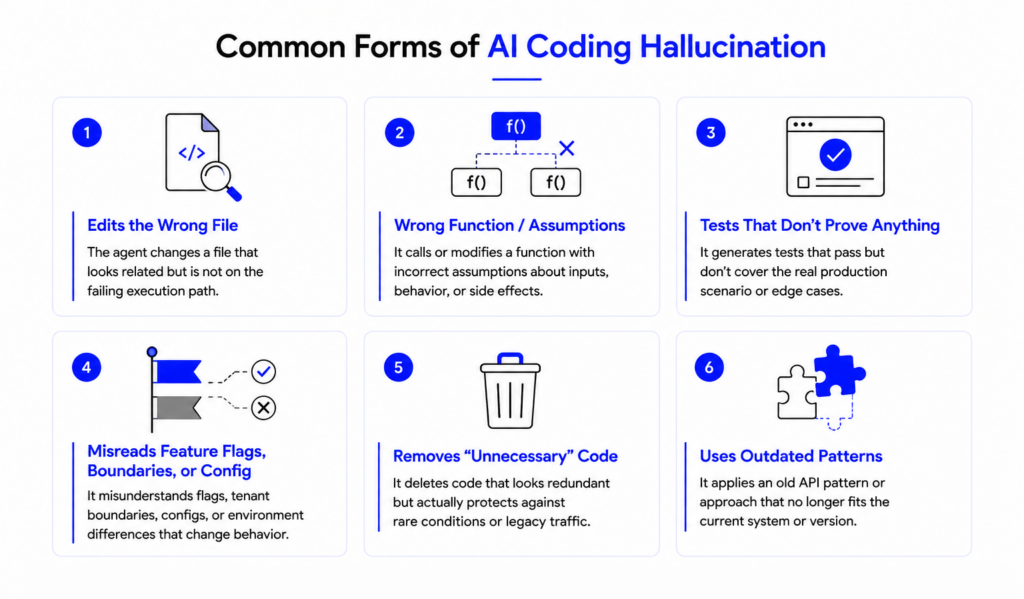
This is not about an invented package, a non-existing API, or code that fails to compile. With modern coding agents, hallucination is usually more subtle. The agent may generate a test that passes but does not cover the real production bug. The agent may also misunderstand a feature flag, tenant boundary, cache rule, retry path, or compatibility branch. It may remove code that looks redundant but protects a production edge case. It may use an API pattern that worked in an older version but no longer applies.
Code hallucination is different from chat hallucination. A false answer in a chat may mislead someone. A hallucinated fix by a coding agent can become a pull request, a deployment, a regression, or a security issue. It takes time and effort to recover from such an incident.
The Root Causes of Hallucinated Fixes in Production Environments
When resolving production issues, hallucinated fixes usually come from weak context. Agents can read files, follow imports, inspect tests, and still miss the behavior that matters in production.
Common causes include incomplete repository context, missing runtime behavior, weak tests, misleading names, and lack of production telemetry. Over-broad prompts make this worse because the agent is asked to solve a large problem from incomplete evidence.
Production systems are shaped by history. The codebase may include feature flags, customer-specific behavior, temporary migration logic, retry rules, and defensive checks added after previous incidents. Some of that code looks unnecessary until real traffic hits it.
The same function may behave differently with production data volume. A failure may appear only under concurrency. A dependency may fail only under a specific latency condition. A route may be low-traffic but high-risk.
| Problem | What the Agent May Assume | What Production Reality May Show |
| Error near validation logic | Validation is the cause | Downstream timeout is the cause |
| Similar function name | This function handles the request | Another service handles the path |
| Passing unit test | Fix is safe | Integration path still fails |
| Unused-looking branch | Code can be removed | Branch protects legacy traffic |
Why Static Codebase Context Is Not Enough for Accurate Agent Decisions
Static context is useful. It gives the agent source files, imports, function names, type definitions, comments, tests, dependency manifests, documentation, and pull request diffs. That can help an agent produce a patch that compiles. It can also help with refactors, test generation, documentation updates, and small bug fixes.
The problem starts when the agent treats static code as a complete picture of the system.
Static code cannot reliably show whether a function is actually used in production. It cannot show which path is hot, which errors are increasing, which customers are affected, which dependency is failing, or which deployment introduced a regression. It also cannot prove that a test reflects real behavior.
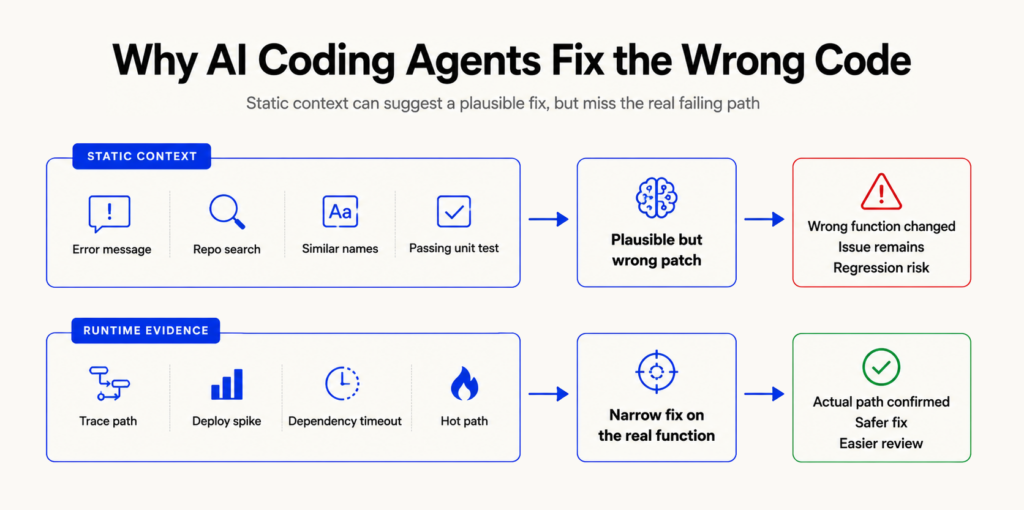
Consider two functions: calculateDiscount() and calculateDiscountV2(). Static search suggests both are relevant. The older function has clearer comments, so the agent edits it. Runtime traces show that only calculateDiscountV2() is called by the checkout flow in production.
Without runtime context, the agent fixed the wrong function. This matters more in agentic coding workflows because the agent may not only suggest a change. It may modify code, update tests, and open a pull request. A wrong assumption can move quickly through the delivery pipeline unless review and runtime guardrails catch it.
What runtime context Resolves That Static Context Cannot
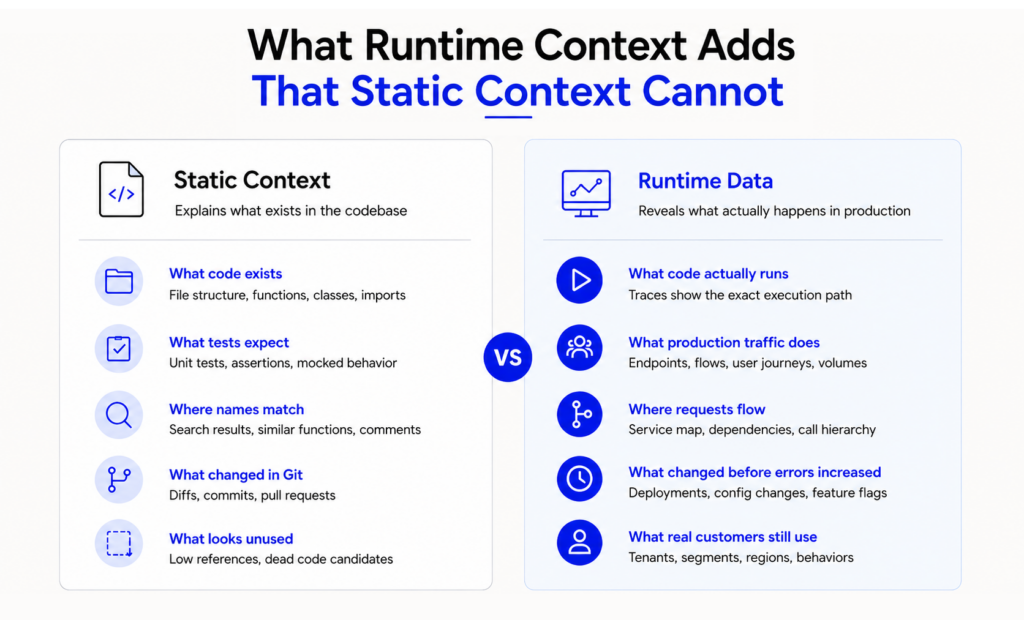
Runtime context is the evidence produced while the system runs. These are telemetry signals as outputs that show activity from applications and operating systems, including events that pass through distributed systems.
For engineering teams, runtime context usually includes traces, logs, metrics, error events, stack traces, service maps, deployment history, feature flag state, request paths, latency data, traffic volume, dependency health, environment variables, etc.
This data helps reduce AI agent hallucination because it connects code to behavior. It shows what actually ran, where the failure happened, and whether the issue started after a deployment. It can also reveal whether the problem is inside the service, in a dependency, or in a specific request path.
Google’s SRE guidance describes latency, traffic, errors, and saturation as the four golden signals for monitoring user-facing systems. Those same signals are useful when an agent is being asked to investigate or propose a production-facing fix.
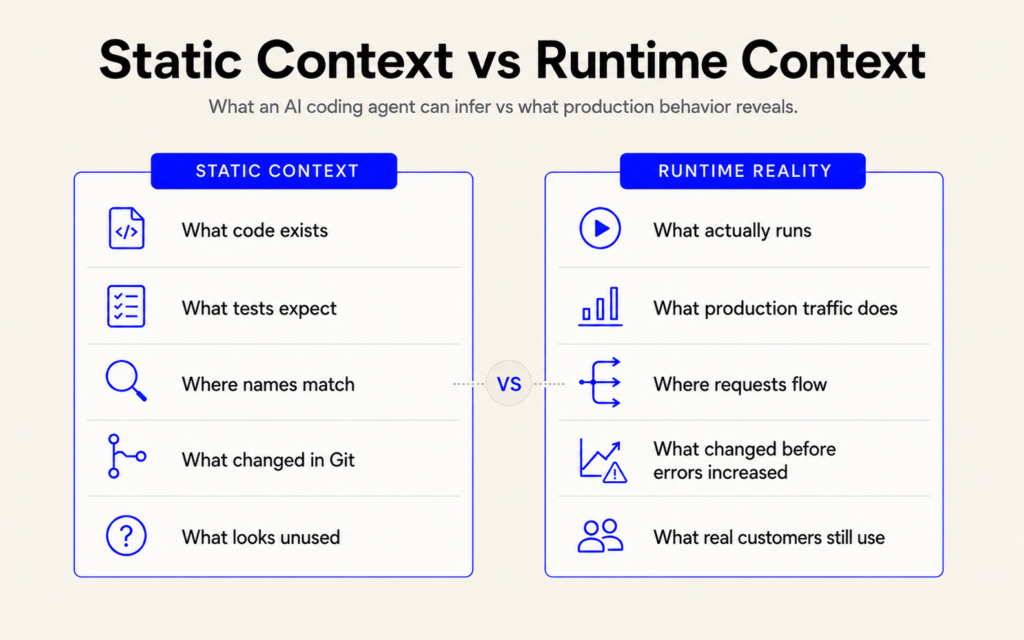
| Static Context Tells the Agent | Runtime Data Tells the Agent |
| What code exists | What code actually runs |
| What tests expect | What production traffic does |
| Where names match | Where requests flow |
| What changed in Git | What changed before errors increased |
| What looks unused | What real customers still use |
Runtime intelligence gives the agent a better starting point. An agent fixing checkout should know which checkout path is active, which provider call is slow, which deployment changed behavior, and whether the error affects one tenant or all users. Tools like Hud can surface that context inside the IDE.
This is also where runtime guardrails for AI coding agents help. Teams can constrain agent actions based on production risk, ownership, and operational signals. A documentation update does not need the same controls as a payment logic change.
During incidents, automated root cause analysis can also help connect errors, traces, deployments, and ownership. Agents become more useful when they start from that evidence instead of guessing from file names.
How to Ground AI Coding Agents in Production Reality
The solution is not to reduce AI coding agent usage. It is also not to trust them blindly. The better approach is to give agents stronger context and tighter boundaries.
1. Give agents scoped tasks
Agents perform better when the task is narrow and reviewable. “Fix checkout failures” is too broad. “Investigate the increase in payment timeout errors after the latest deployment and propose a narrow patch” gives the agent a clearer target. Also, you can provide the specifics related to the error that increases the likelihood of pinpointing it by the agent in code or even in production configuration.
2. Attach runtime evidence to the task
Include stack traces, logs, traces, error rates, recent deployments, affected endpoints, feature flag state, and examples of failing requests. The agent should not infer the failure path from naming alone.
3. Connect code changes to ownership
Agents should know which team owns the service, which files are sensitive, and which changes require extra approval. This helps prevent casual edits to authentication, payments, infrastructure, data access, or migration logic.
4. Use runtime context before proposing a fix
Agents should verify the function is on the request path. Agents are responsible for gathering data to verify the error is correlated to a recent deployment, a dependency, a spike in traffic, or a change in a feature flag before a code change is suggested.
5. Require human approval for risky areas
Human review still matters. Authentication, authorization, payments, infrastructure, dependency upgrades, database migrations, and customer-facing release paths should require explicit review by the right owner.
6. Validate with production-shaped tests
Generated tests should not only confirm the agent’s assumption. They should cover the observed failure, the regression case, and the relevant integration path. A unit test around a helper function is weak evidence if the real failure happens across a provider call, queue, cache, or feature flag path.
7. Keep an audit trail
Teams should be able to see what the agent was asked to do, what files it inspected, what runtime context it used, what tests it ran, and why it proposed the fix. This matters during code review and incident analysis.
8. Measure production outcomes
Do not measure only the lines of code or number of pull requests. Track regression rate, review burden, escaped defects, rollback frequency, MTTR, and time saved on safe, bounded work.
Before runtime grounding, the agent reads an error message, searches the repository, edits a plausible helper function, adds a unit test, and opens a pull request.
After runtime grounding, the agent checks traces, confirms the failing request path, sees the error started after a deployment, identifies the function on the hot path, proposes a narrow fix, adds a regression test, and flags the change for owner review.
FAQ
Why do agents produce fixes that break in production?
Agents often rely on incomplete context. They may see code structure, names, comments, and tests, but miss runtime behavior, real data shapes, feature flags, dependency failures, and traffic patterns. A fix can look correct in the repository while failing under production conditions.
How does code hallucination differ from chat hallucination?
Chat hallucination is usually a false or unsupported statement. Code hallucination can become an actual code change. It may compile, pass shallow tests, and still break production because the agent misunderstood the system behavior, execution path, dependency behavior, or operational risk.
What runtime context reduces AI agent errors most effectively?
Traces, logs, metrics, error events, stack traces, deployment history, feature flag state, dependency health, and service ownership are the most useful signals. The best runtime context connects a symptom to the actual request path, recent change, affected service, and production impact.
Why do agents fix the wrong function without runtime context?
Static code may have things like similar variable names, old implementations, unused branches, and many relevant looking code paths. Lacking traces or execution evidence, an agent may use the code that seems most relevant, instead of the code that is actually executed in the failing request path.
How should teams respond when an AI fix causes a regression?
Treat it like any production regression first. Roll back, mitigate, and stabilize the system. Then review the agent workflow: what context it used, what review missed, which tests were weak, and what runtime guardrails should be added before similar tasks run again.
About authors