Feature flags make software releases less risky. A team can deploy code today, keep a feature hidden, and expose it later to a small group of users. That control is useful, but it can also create false comfort. A flag does not completely remove production risk. It moves part of the release decisions into runtime. Once the flag goes live, the system behaves differently. Runtime monitoring is what shows whether that difference is safe or not.
Key Takeaways
- Feature flags separate deployment from release, but they still change production behavior once enabled.
- Progressive delivery works only when teams can compare flagged and unflagged behavior under real traffic.
- Existing monitoring solutions often shows service health, but not the exact code path affected by a feature toggle.
- Canary deployment and dark launching both need runtime visibility, because it already affected infrastructure and code dependencies.
- Hud can directly provide this by capturing function-level production behavior, including execution durations, exceptions, invocation counts, and call relationships.
What Happens to a Production System the Moment a Feature Flag Goes Live
A feature flag is usually treated like a switch. That is accurate enough for release management, but it hides what happens inside the system. The switch decides which code path runs, and that path may touch different functions, database queries, queues, caches, and third-party services.
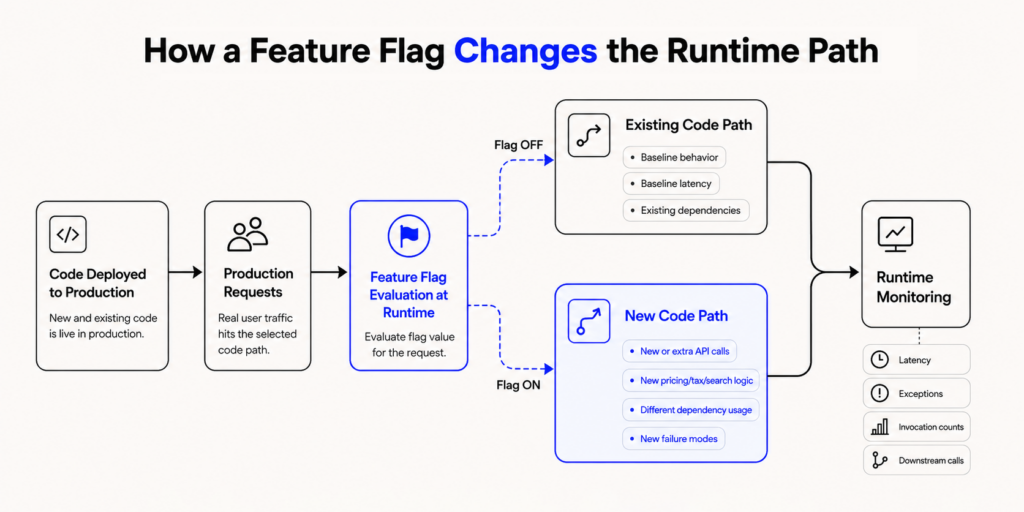
Feature flags may look small, but they still change production behavior. A frontend flag can add extra API calls, while a backend flag can route users through new pricing, tax, search, or A/B test logic. That is why feature toggles are useful. They decouple deployment from release, letting teams ship code before exposing it to end users.
Production only sees behavior, not whether the change came from a deployment, configuration update, or flag rule. If a flagged branch adds latency, throws exceptions, or calls a dependency more often, the system pays the cost immediately. That is why feature flags align closely with continuous deployment thinking, where deployment ships the code, flags activate parts of it, and runtime monitoring shows what users and services actually experience.
Why Shipping a Flag and Understanding It Are Two Completely Different Things
Shipping a flag means the code path exists in production. Understanding a flag means the team can explain what happened after real users touched that path. Those are different things.
A team may ship a feature behind a default-off flag, see the deployment pass, and leave dashboards looking clean. Days later, someone enables the flag for a small group of users. No new deployment appears in the release log, but production behavior has changed. If an issue starts, engineers may have to connect the flag change, affected endpoint, tenant, and error pattern by hand.
The same gap appears in different rollout patterns:
- Progressive delivery brings a new traffic mix at each stage. Internal users may have clean test accounts, while later groups may include old data, high-volume tenants, regional integrations, or less-tested workflows.
- Canary deployment can look healthy at the service level while one flagged path fails for a small but important group of requests.
- Dark launching can hide runtime load because users may not see the feature, even though the new path is already adding database reads, service calls, or queue work.
The useful question is not only “Did the deployment work?” It is “Did the flagged functionality behave as expected once the flag is on?” Teams need to compare latency, exceptions, request volume, resource use, and downstream calls between flagged and unflagged users.
Hud fits this gap because it focuses on live code behavior, not only high-level service health. Its Runtime Code Sensor captures function-level production data such as execution durations, exceptions, activity, invocation counts, and call relationships. That does not make a rollout safe by itself, but it gives engineers clearer evidence when a flagged branch becomes slower, noisier, or starts failing for the users now receiving it.
Why Existing Monitoring Tools Were Not Built for Flag-Driven Deployments
Most monitoring setups are built around services, endpoints, hosts, containers, traces, logs, and infrastructure metrics. Those signals still matter. They tell teams whether a service is down, whether latency crossed a threshold, and whether errors are increasing.
Feature flags create a smaller and more conditional problem. The service may look healthy overall, while the flagged cohort is having a bad experience. A payment service can show normal p95 latency while users on new_payment_retry=true wait longer. An API can look stable until requests are separated by tenant and flag state. A queue can drain normally for most jobs, while a flagged import path builds a backlog for one customer group.

The difficulty grows when multiple flags are active. One flag may change caching behavior. Another may change the search ranking. Both may be safe alone. Together, they may return stale results if the cache key does not include the ranking mode. The dashboard may not make that obvious, because this is not a broad outage. It is a runtime state problem.
The flag state also changes faster than deployments. A team may deploy twice a day, but adjust rollout rules several times during one release window. Someone may enable a flag, reduce exposure, pause it, change targeting, and enable it again for another cohort. If flag changes are not tracked alongside deployment events, the most important runtime change can disappear from the release timeline.
Ownership can also become unclear. The product team may decide the rollout cohort. Engineering owns the code. The platform team owns the monitoring tools. Support hears from customers first. When a flagged release causes trouble, every group has part of the picture. The fix usually starts when those pieces are connected.
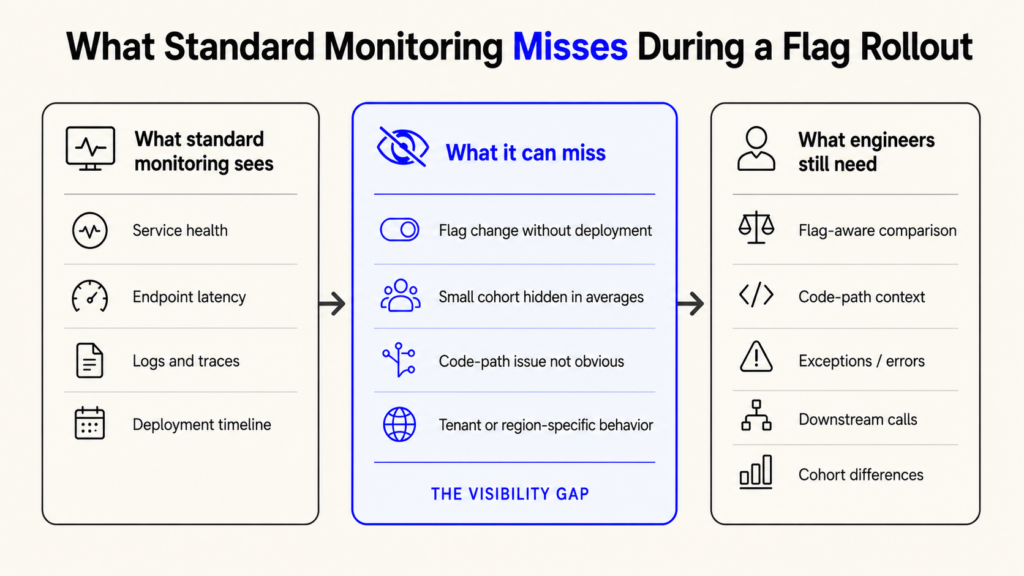
This is a gap between observability built for people reading dashboards and runtime intelligence built to connect production behavior back to code. Hud says its runtime layer runs with the codebase, gathers forensic context when production issues occur, and sends that context to coding agents or developers.
That does not replace logs, traces, metrics, or incident monitoring. It complements them. For flag-driven delivery, teams need to know not only that something changed, but which runtime path changed and how that path behaved under real traffic.
How to Roll Out Flags Safely With Runtime Visibility in Place
A safer rollout starts before anyone turns the flag on. The team should know why the flag exists, what code path it controls, who owns it, what failure looks like, and how rollback works. That sounds basic. It is often skipped when teams are moving quickly.
A feature flag should not be treated like an ordinary config value. It is a production control. It decides which users receive which behavior, and it can change system load without a deployment.
- Define the flag type before shipping it. Release flags, experiment flags, permission flags, ops flags, and entitlement flags have different lifetimes.
- Add an owner and expiry date. Temporary release flags should not remain after the old path is no longer needed.
- Record flag changes as release events. Enablement, percentage changes, targeting edits, and rollbacks should appear in the investigation timeline.
- Compare cohorts. Watch flagged and unflagged users separately for latency, errors, request volume, and important workflow outcomes.
- Watch code-level behavior. Pay attention to functions, database calls, queues, and third-party services touched by the flagged branch.
- Keep rollback simple. Turning off the flag should be faster than debating whether to continue the rollout.
- Review stale flags during release management cleanup. Old flags make the code harder to test and reason about.
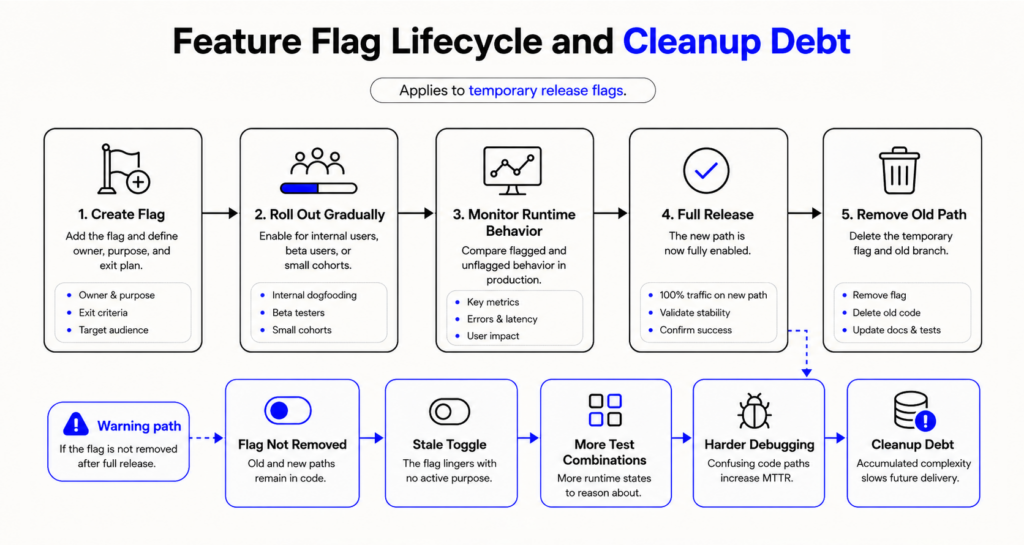
Flag cleanup deserves more attention than it usually gets. Some flags are meant to live a long time, such as entitlement flags, operational kill switches, and tenant-specific controls. Temporary release flags are different. Once the new behavior is fully rolled out, the old branch may no longer be reachable, but it can still add code complexity, test overhead, and confusion during later debugging. That is why the temporary flag and old code path should usually be removed.
There is research behind this concern. A 2026 study of feature toggle dynamics in Kubernetes and GitLab found that toggle removals lagged behind additions, leading to growing toggle inventories. The study also reported long median lifespans, with Kubernetes toggles lasting a median of 734 days, and GitLab toggles lasting a median of 185 days in the analyzed data.
Runtime visibility also helps after a bad rollout. Without it, engineers may search logs, compare commits, inspect traces, and ask who changed a flag. With better runtime context, the first question can be more direct: which flagged path ran, which function slowed down, which dependency changed, and whether the same issue appears outside the flagged cohort.
Hud’s MCP Server is a better option for teams using AI coding agents in this workflow. Hud describes its MCP Server as a way to provide agentic AI with real-time, production-level awareness of code behavior, using data from the Runtime Code Sensor. The useful point is not that an agent should decide rollouts alone. It is necessary for engineers and agents to have production evidence when proposing fixes for flagged code paths.
Final Thoughts
Feature flags give teams more control over releases, but they also move more decisions into runtime. The code may already be deployed, but the real change happens when the flag reaches users, tenants, queues, and dependencies.
Runtime monitoring completes the picture. It shows what the flagged path actually did, not just whether the service looked healthy from a distance.
FAQ
How long should a feature flag remain active before it is treated as a permanent part of the codebase?
A temporary release flag should usually be reviewed within days or weeks after full rollout. The exact timing depends on rollback risk and customer migration. Once the old path is no longer needed, remove it. Long-lived flags should be documented as operational, entitlement, or tenant-control flags.
Who owns monitoring responsibility for a flag once it is live: the team that shipped it or the platform team?
The team that shipped the flag should own the behavior once it is live. The platform team can provide alerting standards, rollout tooling, and shared dashboards. Ownership should stay close to the service team because they understand the expected behavior, user impact, and rollback path.
Does the number of simultaneously active flags change the monitoring requirements in a meaningful way?
Yes. More active flags create more runtime combinations. A service with several overlapping flags may behave differently across tenants, regions, plans, and request types. Monitoring should segment important workflows by flag state so small failures do not disappear inside broad averages.
How do you handle flag state consistency across multi-region or multi-tenant deployments?
Treat the flag state as a production configuration. Use controlled propagation, audit history, and region-aware rollout checks. For multi-tenant systems, avoid assuming one tenant’s success proves global safety. Monitor tenant cohorts separately, especially when data shape, usage volume, or integrations differ.
About authors