Suppose you are a developer adding loyalty discount functionality to a shopping cart, and you ask an AI coding assistant to develop the feature. After the agent develops the code and compiles it, you send the Pull Request. The CI runs static code analysis, including type checks, unit tests, etc and all pass successfully. After review, when it’s merged and released, just imagine the situation where all checkouts fail with a timeout error. An absolute disaster.
The code changes were entirely valid. The agent wrote a lot of code quickly, and a PR that compiles and passes CI tends to get a quick review. Even a careful review would have missed this, because the problem only shows up in production: how slow a dependency really is, how big real carts get, and how much headroom the service has.
AI code generation has made writing code cheap, but whether that code is safe depends on production, the one thing the agent can’t see. The Model Context Protocol (MCP) gives agents a way to ask production before they open a PR.
Key Takeaways
- Agents write from a static view. Code, types, and tests alone do not show production latency or real cart sizes. Without that context, an agent may put a network call inside a loop without recognizing the timeout risk.
- MCP gives agents a standard way to ask. Any compatible agent can discover and call tools on an MCP server, including servers that hold live runtime data.
- Production questions shift left. Asked before the PR, questions about speed, callers, and recent deployments save a review round, a QA ticket, or a customer report.
- Runtime evidence makes fixes smaller. Forensics captured when unexpected production data breaks a change lets the agent fix the exact path without recreating the incident.
- Context has a cost. A good MCP server returns the few invocations that matter, which leaves room in the agent’s context window.
Why AI Coding Agents Fail Without Production Context
An AI coding agent reasons from static code, types, and tests, and sometimes from running the app locally. None of that shows what a live system sees: real data, real traffic, and the odd ways real users behave, which is where the facts that decide whether a change is safe come from.
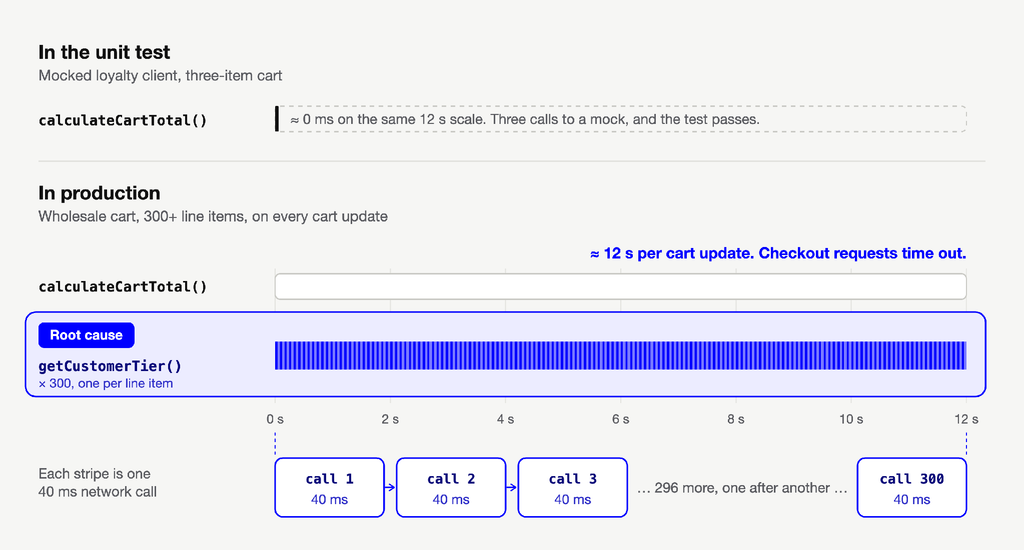
Let’s look at what the agent did with the loyalty discount. Inside, calculateCartTotal() calls an existing helper getCustomerTier(customerId) once for each line item to apply product-specific rules. The code is easy to read, and the unit test covers the scenario with a cart of three items and a mocked loyalty service. The total is correct, and all tests pass.
Here is what the agent couldn’t see:
- getCustomerTier() Makes a network call that takes around 40 ms in production, not the zero milliseconds of a mock.
- A handful of wholesale accounts check out with 300 or more line items.
- calculateCartTotal() Runs on every cart update, not just at payment.
Put those together, and the failure is a short causal chain. A per-item lookup becomes 300 sequential network calls for a big cart, which adds about 12 seconds to each cart update. Checkout requests for those accounts start timing out. With checkout failing, rolling back the whole loyalty feature is the only safe option, because the alert shows that checkout is slow, not which part of the change caused it. No test failed, because no test knew any of this, and nothing in the diff showed that the helper makes a network call.
So why did this happen?
The agent wrote the change without production context. As one post on why coding agents need runtime guardrails puts it, agents “see code, tests, docs.“ They don’t see behavior. A developer writing it by hand would have the same blind spot, and the timeout is just one symptom: code review doesn’t tell you how often a given function runs, how close a service is to the edge, or what real data looks like.
Agents make the gap more expensive because they open PRs faster, so more of these misses reach production, where each one costs a rollback, a follow-up PR, and another review. In DORA’s terms, a deployment like this counts toward change failure rate.
You may wonder about the monitoring you already have. Production monitoring tools collect latency percentiles, error rates, and traces, and here they did fire an alert, after release. But they were built for people reading dashboards, and an agent in an editor has no dashboard. Unless that data is exposed as a tool it can call, the agent can’t ask for it mid-task. That gap between monitoring built for humans and context an agent can use is the one MCP helps close.
What MCP Is and How It Connects Agents to Live Runtime Data
The Model Context Protocol is an open standard for connecting AI applications to outside systems. Anthropic released it in November 2024, and the major coding agents, including Claude Code, Cursor, GitHub Copilot, and Windsurf, now support it. Put plainly, MCP is an agreed way for an agent to find out what an external system can do and then ask it to do that.
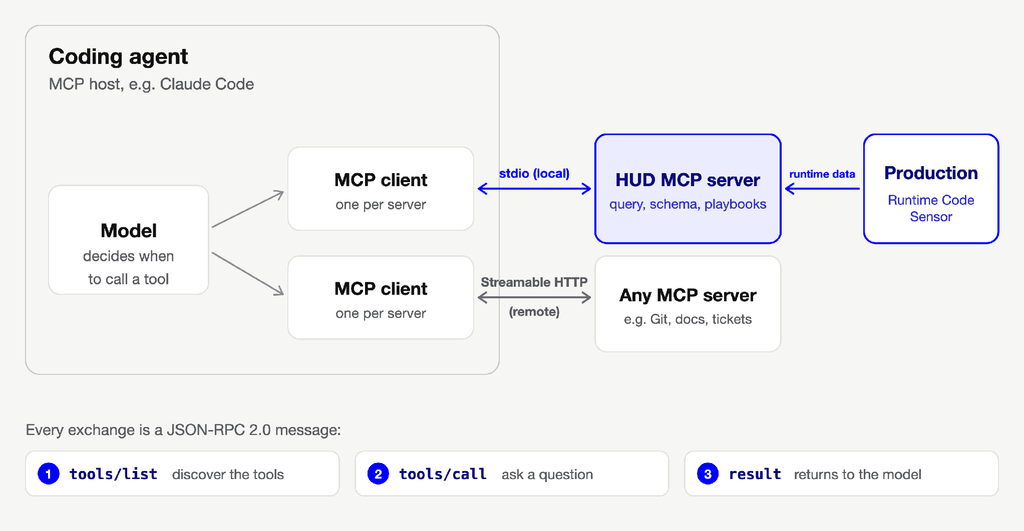
The MCP architecture has three parts. The host is the AI application you work in, such as Claude Code or an IDE. The host creates one client for each server it connects to. The server is the program that provides context and actions. A server can run locally over standard input and output, or remotely over Streamable HTTP, and messages in both cases use JSON-RPC 2.0.
Servers expose three kinds of primitives:
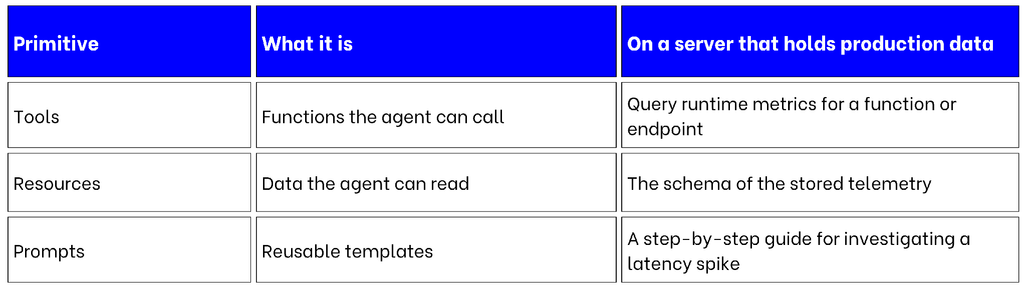
As for runtime context, the flow is short. The client asks each server for its tools with tools/list and those tools join the agent’s registry next to file edits and shell commands. When the model decides it needs outside information, the host routes a tools/call request to the right server and puts the result back into the conversation.
With that in place, the agent on the loyalty ticket can check production at the exact moment it decides to call getCustomerTier() in a loop, and the answer lands in the same context where it is writing code, so it shapes the diff instead of a postmortem. One server, written once, works with every host that speaks the protocol, with no custom integration per agent.
How Hud Exposes Production Truth Through MCP
A protocol is only as useful as the server behind it. For the loyalty ticket, the agent needs a server that knows how getCustomerTier() behaves in production. We built Hud as a Runtime Code Sensor for exactly this: it runs with every function in production and counts every invocation. A lightweight SDK auto-instruments your code, so there is no manual instrumentation, and it supports Node.js, Python, and Java.
Two kinds of data come out of it. The first is a continuous, function-level view of code behavior: how long functions take, how often they run, which endpoints they serve, and how that changes from one deployment to the next. The second is forensic information. Our Forensic Engine gets the execution path, parameters, dependencies, and the machine state at the moment an error, spike or degradation occurs. The evidence is fix-ready, and an agent can open a fix PR directly from it.
Coding agents can be accessed either through our MCP server, included with the HUD IDE extension, or running standalone with an API key or hosted server over HTTPS. The setup guide covers Cursor, Claude Code, Copilot, Windsurf, Augment, and Kiro. Once you install the HUD IDE extension and sign in, adding the server to Claude Code is a single command:
claude mcp add hud –scope user -t stdio ~/.hud/mcp start
Our engineers wrote about how we built an MCP that lets an agent ask anything about production: a query tool that takes SQL, a schema tool that explains what is stored and how to aggregate it safely, and playbooks for slow endpoints, duration spikes, and deployment impact. Large results land in a local file and the agent reads only the rows it needs, which keeps its context window for the actual work.
Run the loyalty ticket again with Hud connected, and before writing the loop the agent asks:
- What is the p90 duration of getCustomerTier() in production?
- Which endpoints call calculateCartTotal(), and how often?
- Has /checkout been slower since the last deployment?
The answers change the plan. A network call of tens of milliseconds, inside a function that runs on every cart update, can’t run once per line item, so the agent writes one batched tier lookup per cart and cites the production numbers in the PR description. If something still slips through, the forensics from the failing request, including its execution path and parameters, go back to the agent over the same connection, and the follow-up PR fixes that one path instead of rolling back the whole feature. Our write-up on narrowing an incident from 63 commits to one shows how much that precision shortens the search.
From Plausible Code to Production-Safe PRs
Coding agents already produce plausible code. Whether that code is safe depends on production, and MCP gives agents a standard way to check production while they are still writing the change, before it reaches customers.
The lesson reaches past this one ticket. Whoever writes a change, a person or a model, needs the runtime facts it depends on, and those facts matter most when the change touches a hot path in a live system. In more broadly scoped changes, the facts may still be quite relevant. In smaller changes, like method calls, those facts may not be relevant at all.
Agentic workflows still have review and approval gates, but runtime context improves what gets to those gates. For AI-generated PRs, it’s the difference between a rolled-back feature and a batched lookup that ships the first time. Book a Hud demo and plug it into the agent you’re already using if you want your agents working from production truth.
FAQ
What types of MCP servers can coding agents connect to?
An MCP server can run behind any system having an API. Coding agents typically connect to file systems, Git hosts, databases, issue trackers, documentation, and runtime or observability data. Local servers run on the developer’s machine using standard input and output. Remote servers are hosted services that work over Standard HTTP and typically require authentication.
How does MCP differ from standard API tool-calling for agents?
Tool calling is the model’s ability to request a function, and MCP standardizes where those functions come from. With plain tool calling, each application hard-codes its own tool definitions and integrations. With MCP, the host discovers tools from any compliant server at runtime, so one server works across Claude Code, Cursor, Copilot, and other hosts.
How does Hud expose runtime data to coding agents?
Through its MCP server. Behind it sits the function-level data our Runtime Code Sensor collects, including an aggregated, always-on call graph of your service and exceptions recorded at line level. This allows an agent to follow a slow endpoint through its callers to the exact line that threw an exception, without leaving the editor.
What production signals matter most for AI-generated PRs?
The ones tied to the code being changed. Function duration and call frequency show whether a new call is affordable. Agents can ascertain the affordability of adding a new function call using signals related to function duration and call frequency. Forensics from failing requests show the exact path and inputs. Host-level averages rarely tell an agent which of two implementations is safer.
Does using MCP increase token usage for coding agents?
It can. Many clients load every tool definition into context up front, and each intermediate result passes through the model. Anthropic’s engineers described cutting one workflow from 150,000 tokens to 2,000 by having agents write code that calls MCP tools. Servers that return specific data or file paths can reduce the usage of coding agent tokens.
About authors