
Error Budget

Reliability is not about chasing perfect uptime. Perfect uptime sounds good in a meeting, but in real systems, it can slow teams down, increase cost, and create fear around every release. An error budget provides engineering and product teams with a more practical way to discuss reliability. It defines the threshold for failure beyond which users feel the service is unreliable.
What is an Error Budget?
An error budget is the amount of unreliability a service can “spend” while still meeting its service level objective (SLO). In simple terms, it is the gap between the reliability target and 100% perfection. If a service has a 99.9% availability SLO, its error budget is 0.1%. That 0.1% can represent failed requests, downtime, latency violations, or another user-facing failure metric, depending on how the team defines the SLI.
This matters because software teams are always under two competing pressures. Product teams want new features, engineering teams want stable systems, and users want both. An error budget creates a shared rule for that trade-off.
When the budget is healthy, the team can ship with confidence. When the budget is almost gone, the team slows down and focuses on reliability. It turns reliability from a vague concern into a measurable engineering decision.
How Error Budgets Are Calculated and Tracked
The basic formula is simple:
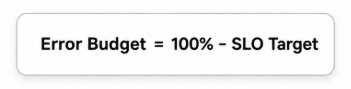
So, if your SLO is 99.9%, your error budget is 0.1%. In a 30-day month, that translates to about 43.2 minutes of allowed downtime if you measure availability in terms of time. For a request-based service, the same 0.1% may mean 1,000 failed requests out of 1,000,000 total requests.
But calculating the number is only the beginning. Teams also need to track how quickly the budget is being consumed. This is usually called the burn rate. A burn rate of 1 means the service is consuming the budget at the expected pace. A burn rate above 1 indicates the service is spending the budget too quickly and may miss its SLO before the window ends.
A useful tracking setup usually includes:
- Current budget remaining
- Burn rate over short and long windows
- Alerts for fast budget consumption
- Links to incidents, deployments, and dependency failures
- Weekly or sprint-level reliability review
This is where error budget automation becomes helpful. Instead of asking engineers to manually check dashboards before every release, teams can connect error budget data to CI/CD pipelines, deployment gates, and alerting tools. For example, a release can be allowed when the budget is healthy, require approval when the budget is low, or be blocked when the service has already crossed its risk threshold. Google’s SRE guidance also recommends using SLOs and error budget signals to make operational decisions, not just to build dashboards.
Error Budget Policies and Implementation in SRE Teams
A good error budget is not just a metric. It needs a policy behind it. An error budget policy explains what happens when the service is healthy, when it is close to missing its SLO, or when it is already outside the allowed budget. Google’s example policy says releases can continue when the service is meeting its SLO, but if the budget is exceeded over a four-week window, changes may be halted except for high-priority fixes or security work.
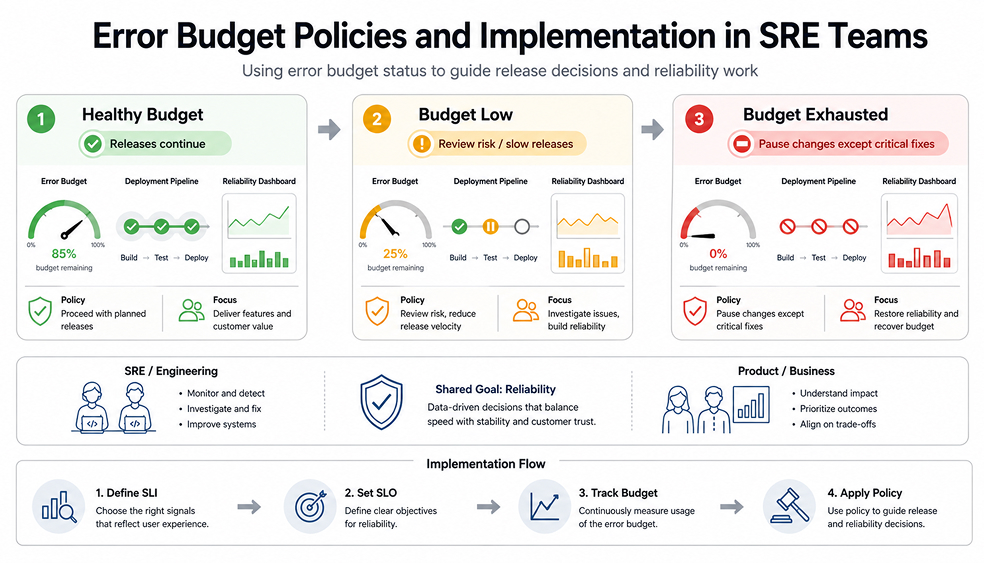
This does not mean every company should copy that policy exactly. A payments API, a reporting dashboard, and an internal admin tool do not need the same reliability target. The right error budget implementation depends on user impact, business risk, traffic patterns, and how quickly the team can recover from failure.
A practical implementation usually starts small. Pick one important service. Define one or two user-facing SLIs. Set a realistic SLO. Then track the budget for a few weeks before linking it to release decisions. If the alerts are too noisy, adjust the SLO or improve the SLI. Google’s SRE workbook notes that SLOs should evolve when they no longer align with real user-facing problems.
The biggest mistake is treating the budget as a permission slip to be careless. It is not. It is a safety boundary. When teams use it well, they can move faster because they know when risk is acceptable and when stability needs attention.
Final Thoughts
Error budgets are useful because they make reliability easier to discuss and act on. Instead of arguing whether the team should ship faster or slow down, everyone can look at the same budget and make a practical decision. When the budget is healthy, releases can continue. When it is burning too quickly, the team has a clear reason to focus on stability before users feel the impact.
FAQs
1. What is an error budget policy, and how does it guide release decisions?
An error budget policy is the team’s agreement on what to do when reliability starts to slip. If the budget is still healthy, normal releases can continue. If the budget is nearly exhausted, the team may slow down, review risks more carefully, or focus on fixes before shipping additional changes.
2. How can error budget automation help teams react faster to reliability issues?
Error-budget automation helps because the team does not have to wait for someone to manually notice a bad trend. Alerts can fire when the budget burns too quickly, and deployment workflows can respond as well. For example, a risky release might require approval or be paused until the issue is understood.
3. What are common mistakes companies make when implementing error budgets?
One common mistake is setting an SLO that sounds impressive but does not align with real user needs. Another is tracking only uptime while ignoring slow requests, failed user actions, or dependency issues. Some teams also create an error budget policy but never use it when release pressure increases.
4. How should engineering and product teams collaborate around error budget consumption?
Engineering and product teams should review the same budget data before making release decisions. Engineering can explain what is causing the reliability risk, while product can explain which features or deadlines matter most. The goal is not to win the argument. It is to decide what best protects users and the business.