Mar 27, 2026
Intro
For decades IDEs have shown us what code looks like; Hudders finally show us what code does.
For decades, the fundamental craft of writing code remained unchanged: open your IDE, see the code, edit the code, write new code. The most significant innovations were syntax highlighting and IntelliSense, awesome tools indeed, but still just scratching the surface of what engineers actually need to know about their code.
We looked at this differently. The code engineers stare at all day isn’t just static text, it has an entire existence and behavior in the real world. That function you’re editing right now – it might have errors you don’t know about. It might have recently slowed down in production. It might have been changed by a colleague yesterday. It might participate in 30 different business-critical flows. Or it might not even run at all…
Traditional IDEs show you what the code *looks like*, but they don’t show you what the code *does*. As a result, engineers may end up making changes to functions without understanding their real-world impact. We thought there had to be a better way for engineers to truly “see” their code – to know all this information as they work.
What if we could overlay reality on top of each function? What if every function could tell you its story?
This led us to the metaphor of a HUD – a heads-up display, like a pilot’s helmet that helps understand the meaning of what you’re seeing. How would that look for software engineers in their IDE?
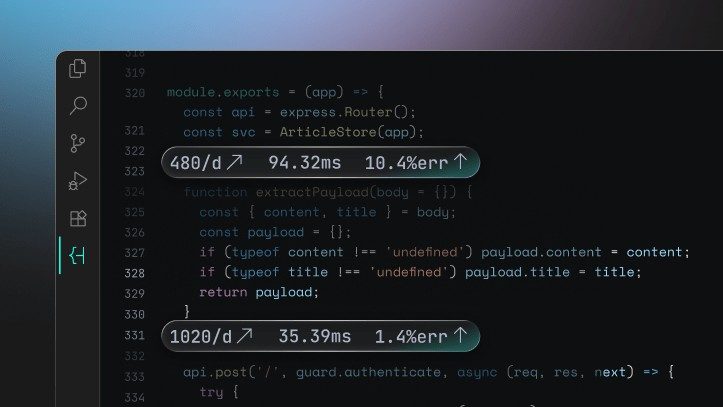
The answer was **Hudders** – Hud’s headers, which are small labels above each function showing live information like:
The beauty of Hudders is that they don’t just show you static information – they provide live production context straight in your IDE. No more context switching between your editor and monitoring tools.
When you’re working on a function, you can immediately see which flows it participates in and whether it has any errors or performance issues in the real world.
Hudders transform how engineers see, understand and interact with their codebase. Instead of working in isolation, you’re now working with full awareness of your code’s real-world behavior.
—
Ready to see your code in a whole new light? Try Hudders and experience live production context directly in your IDE.